

What is self-healing?
An agent that fails several runs in a row is usually genuinely broken — and a broken agent that keeps running unattended can cause real problems, like sending incorrect details over email or Slack, or filling a spreadsheet with bad data. Self-healing helps keep your deployed agents running smoothly. It consists of two independent parts:- Automatic repair — when a deployed agent fails during an automated run, Airtop investigates the failure and prepares a fixed version for you to review.
- Automatic disabling — if an agent keeps failing run after run, Airtop pauses it so it doesn’t continue to fail unattended.
Why agents need self-healing
Agents interact with real websites and services, and those change over time: a page gets redesigned, a button moves, or a service updates how it responds. An agent that worked perfectly last week can suddenly start failing through no fault of your own — often at night or on a weekend, when it’s running on a schedule and nobody is watching. Self-healing acts as a safety net for exactly these situations. Instead of discovering a broken agent days later, Airtop notices the failure right away and starts working on a fix.How automatic repair works
When one of your deployed agent’s automated runs fails, Airtop steps through the following process:- A run fails. The failed run is recorded and a notification is sent. If a repair is starting, Airtop will notify you that we’re attempting to prepare an automatic repair draft.
- Airtop investigates and repairs. Behind the scenes, Airtop opens an Agent Builder session, diagnoses what went wrong, updates the draft, and tests the fix.
- You review the result. When the repair passes its test, you’re notified it’s ready for review. You can inspect the changes in Agent Builder and deploy when satisfied.

View self-healing status
Which failed runs start a repair
Repairable triggers
Automatic repair focuses on runs that happen automatically. A repair can start when a failure occurs during a run started by:- A Schedule
- A connected app trigger — Gmail, Slack, or HubSpot
- An integration or webhook — Zapier, Make, n8n, or a custom Webhook
Exclusions
Some failures don’t start a repair, because there’s nothing for a repair to fix:- Runs you start yourself — from the Run button, since you’re already there to see what happened.
- Failures that need something from you — for example, the agent needs you to sign into a website, or a required integration isn’t connected to your account. Airtop can’t do these on your behalf, so it notifies you instead.
- Account limits — Issues like credit exhaustion or exceeding session caps are not agent-specific and do not trigger repairs.
- Aborted runs — Runs that are canceled before completion.
- Problems on Airtop’s side — A transient Airtop service interruption does not indicate a flaw in your agent’s logic, so no repair copy is generated.
- Test runs inside Agent Builder — while you’re building, you’re the one in charge of fixes.
- If your agent already has a draft in progress, or someone is actively working on it in Agent Builder, no repair starts. Airtop never replaces or edits your draft.
- Only one repair at a time runs per agent. If a repair is already underway, additional failures won’t start another one.
Automatic disabling after repeated failures
Separately from repairs, Airtop protects you from an agent that keeps failing over and over. If an agent’s automated runs — the same scheduled, triggered, and webhook-started runs listed above — fail several times in a row, Airtop disables the agent and notifies you.- The default is 3 consecutive failures, and you can adjust this per agent.
- A successful run resets the count — the streak only grows while every run is failing.
- Failures that need something from you, cancelled runs, and Airtop platform issues don’t count toward the streak.
- Sometimes an agent fails before its run can even begin (for example, a scheduled run that couldn’t start). These count toward the streak too, and because no run took place, they won’t appear in Run History — the agent’s banner will point this out when it applies.
Self-healing settings
Each agent has its own self-healing settings found in the Self-healing tab under Settings: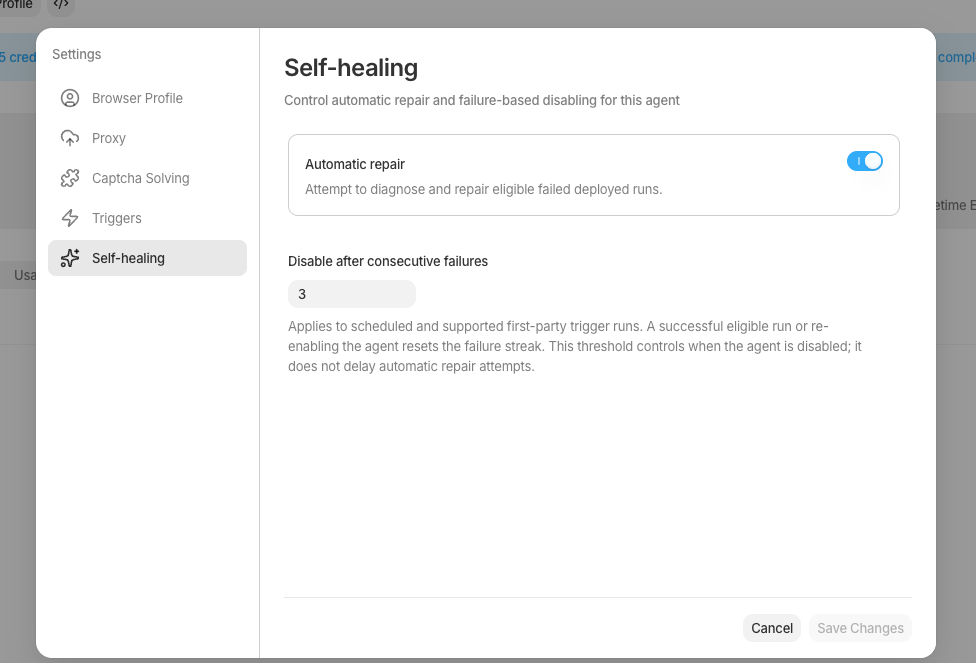
Configure self-healing settings
- Automatic repair: On by default. Turn this off if you’d rather handle failures yourself. Repair sessions use credits, just like a session you’d run yourself in Agent Builder, so this is the switch to use if you don’t want credits spent on automatic repairs.
- Disable after failures: Default is 3. Adjust how many automated runs must fail in a row before the agent is paused.
Frequently asked questions
Will Airtop ever change my live agent without asking?No. Repairs only touch a draft copy. Your deployed version runs unchanged until you deploy the repaired draft. I was in the middle of editing — will a repair overwrite my work?
No. If a draft already exists, Airtop skips the repair entirely to avoid touching your work. What if I don’t like the repair?
Simply discard the draft. Nothing about your deployed agent will have changed. Who handles repairs for a shared agent?
The agent’s owner. Teammates whose runs fail are told a repair is starting, but reviewing and deploying it is up to the owner. How do I make sure my agents will self-heal?
Self-healing is enabled for all agents by default.