
Running Google Ads is difficult. The interface is confusing, proper optimization requires special expertise, and it is very easy to waste thousands of dollars on campaigns that result in junk clicks instead of real conversions. Unless you're a PPC expert, the cards are stacked against you.
We wanted to make Google Ads less frustrating for small teams and solo marketers. So we built native Google Ads automation directly into Airtop, and armed our AI marketing agent Mark with a wealth of specialized knowledge on Google Ads and paid media strategy.
Like many companies, we spend thousands of dollars on Google Ads every month. When we finally audited our own account with Mark, we found broad match keywords pulling in searches that had nothing to do with our product, a keyword with a Quality Score of 1 out of 10 that we were still paying for, and conversion tracking that fired on a button click instead of an actual signup, which meant Google had been optimizing toward the wrong thing for months.
None of that is unusual for a small company. It's what happens when the person running the account has ten other jobs and the interface is built for people who do this all day.
Airtop's Google Ads integration has two parts. Chat with Mark to research keywords, build campaigns, and optimize your account, with every change gated behind your explicit approval. Alongside Mark, you can build compiled agents that run audits and performance reports on a schedule, so problems surface on their own. You can build these read-only agents by chatting with Mark, or by using Airtop's Agent Builder.
You can learn more about the integration below or at airtop.ai/google-ads. If you're brand new to Google Ads and don't have an account yet, start with Google's official guide to creating an account, then come back and connect it. Everything below assumes you have an account with at least a payment method attached.
What the integration does
Keyword research from just your URL. Give Mark your company URL and it researches your market, pulls search volume and bid estimates, and builds the keyword list your campaigns will run on. That includes the searches you don't want to pay for: negatives get added up front, not after they've burned budget.
Campaigns structured the way a good consultant would build them. Themed ad groups, tight keyword sets with explicit match types, and responsive search ads written from your positioning. Mark deploys the build to your Google Ads account as a draft, ready for your sign-off, and nothing spends until you publish it.
A PPC audit that runs on a schedule, not when you remember. Conversion tracking, geo targeting, campaign structure, keyword hygiene, wasted spend, and device performance. Scheduled agents run it hourly, daily, weekly, or on a trigger, with read-only access, and findings land in Slack or email.
Fixes, not just findings. When an audit flags a problem, Mark drafts the fix. Approve it and Mark applies it directly in Google Ads.
Reports in plain English. Search terms reports, device breakdowns, Quality Score audits, and geo performance, with explanations and suggestions instead of just raw numbers.
Here's what one early user told us:
"Airtop handled in one conversation what would normally take me hours to build: campaign structure, keyword research, and deployment. It's the first AI tool I've seen that actually understands how Google Ads works."
Kenan Choufi, Performance Marketing Consultant
What it looks like in practice
The screenshots below are unedited, from a real Mark session against our own account. We asked for a new search campaign pointed at one of our landing pages, with real constraints: a hard budget cap, a weekday schedule, and keyword research to make sure the spend would go somewhere useful.
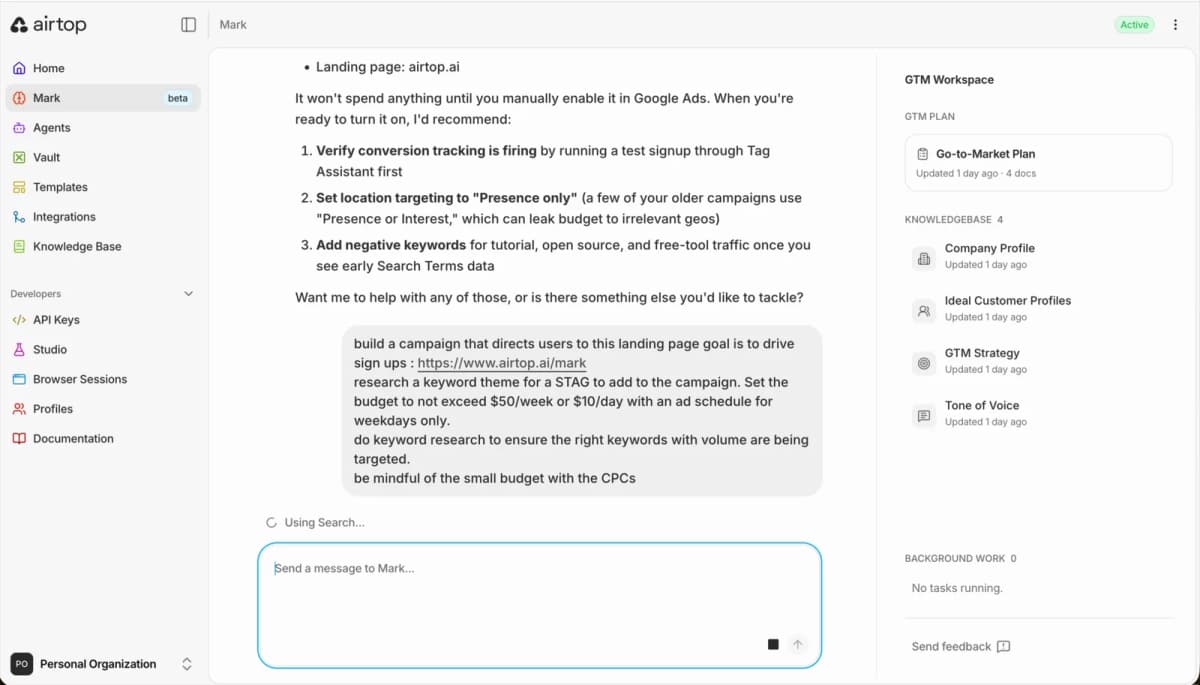
That's the entire brief: a landing page URL, a goal, a budget, and a schedule, written the way you'd type it to a colleague. Notice the recommendations above it. Before building anything new, Mark had already suggested verifying conversion tracking with a test signup, tightening location targeting to "Presence only" on older campaigns, and adding negative keywords once early search terms data arrived.
A few minutes later it came back with the research:
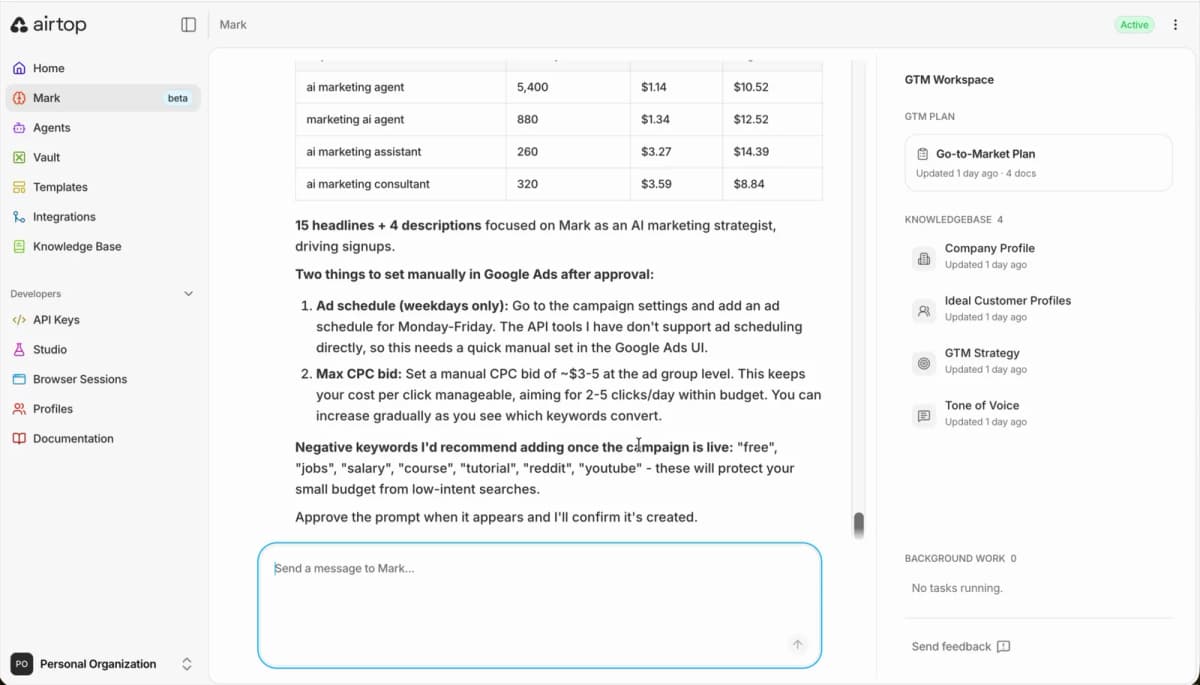
Four phrase match keywords with monthly volume and real bid ranges, 15 headlines and 4 descriptions for the responsive search ad, and a recommended negative keyword list ("free", "jobs", "salary", "course", "tutorial") to protect a small budget from low-intent searches. It's also honest about the boundaries: the Google Ads API doesn't support ad scheduling on this operation, so it tells you exactly which two settings to flip manually in the Google Ads UI instead of pretending it did them.
Before anything touches the account, you get the full spec:
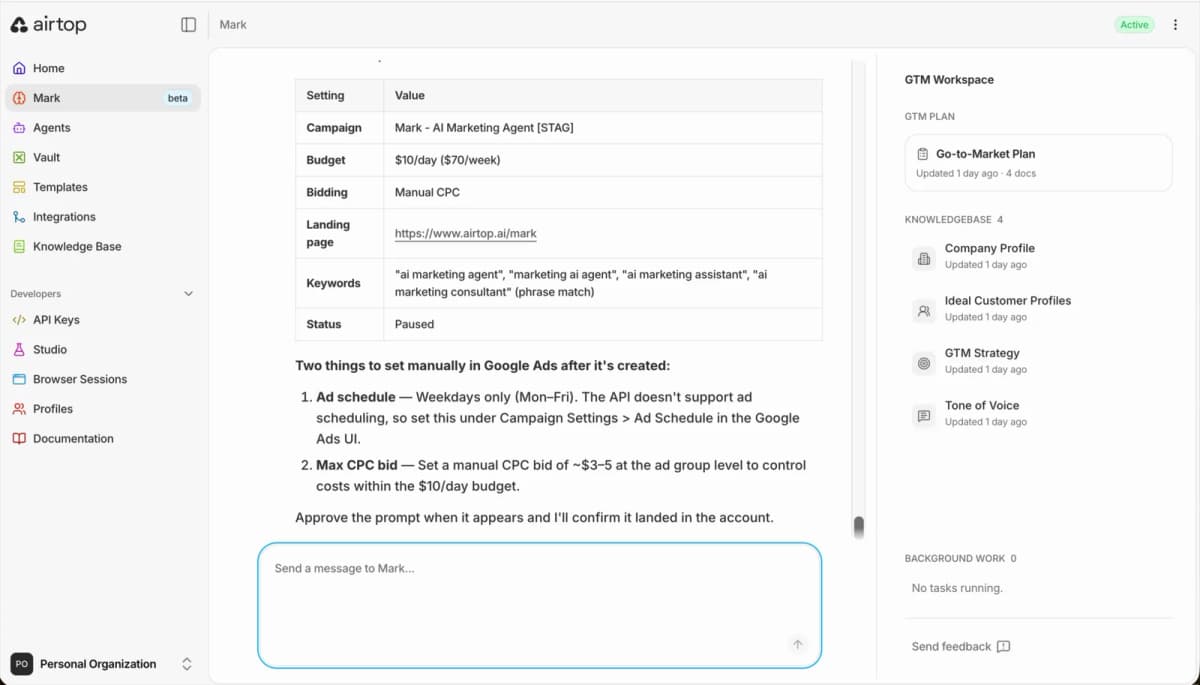
Budget, bidding strategy, landing page, keywords, match types, and status. When you approve a build, Mark deploys it to your account as a draft. It stays unpublished, spending nothing, until you go into Google Ads yourself and publish it. Starting the spend is a step only you can take.
Every write to your account arrives the same way, as an approval card:
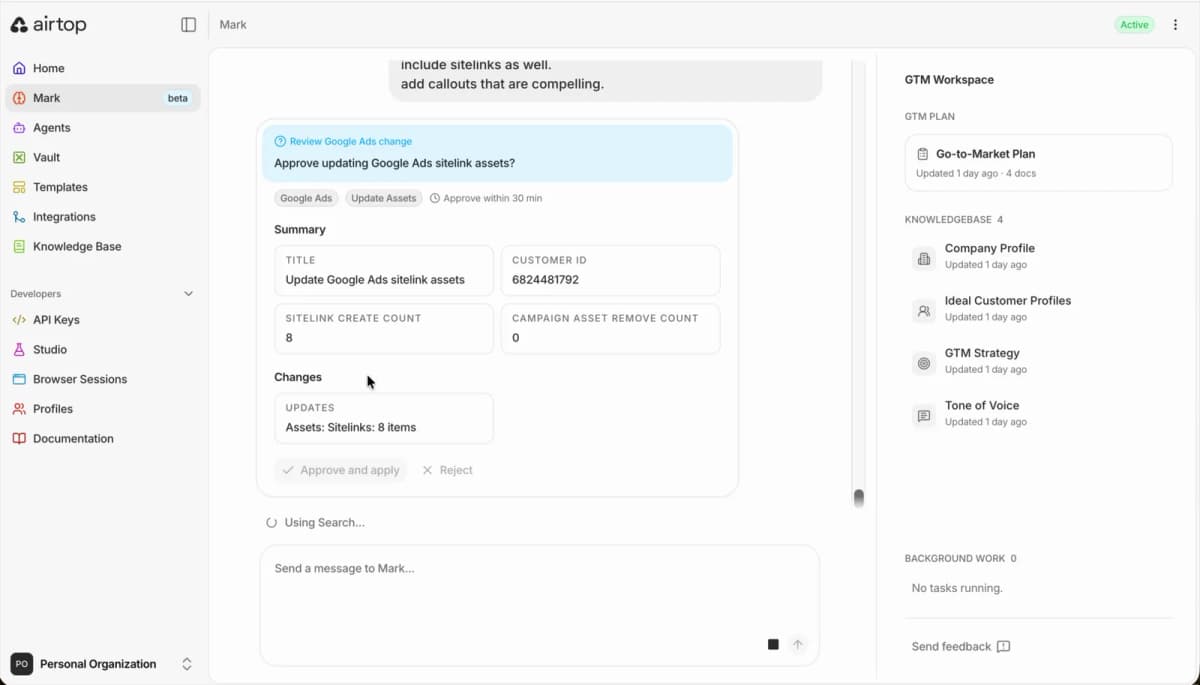
The card summarizes exactly what will change (here, 8 new sitelink assets and zero removals), names the customer ID it will touch, and waits. You approve, reject, or let it expire; approvals are only valid for 30 minutes. There is no mode where Mark quietly edits your account.
And because the changes go through Google's own API, you can verify everything in the Google Ads UI immediately. Here's the ad Mark built, scored by Google itself:
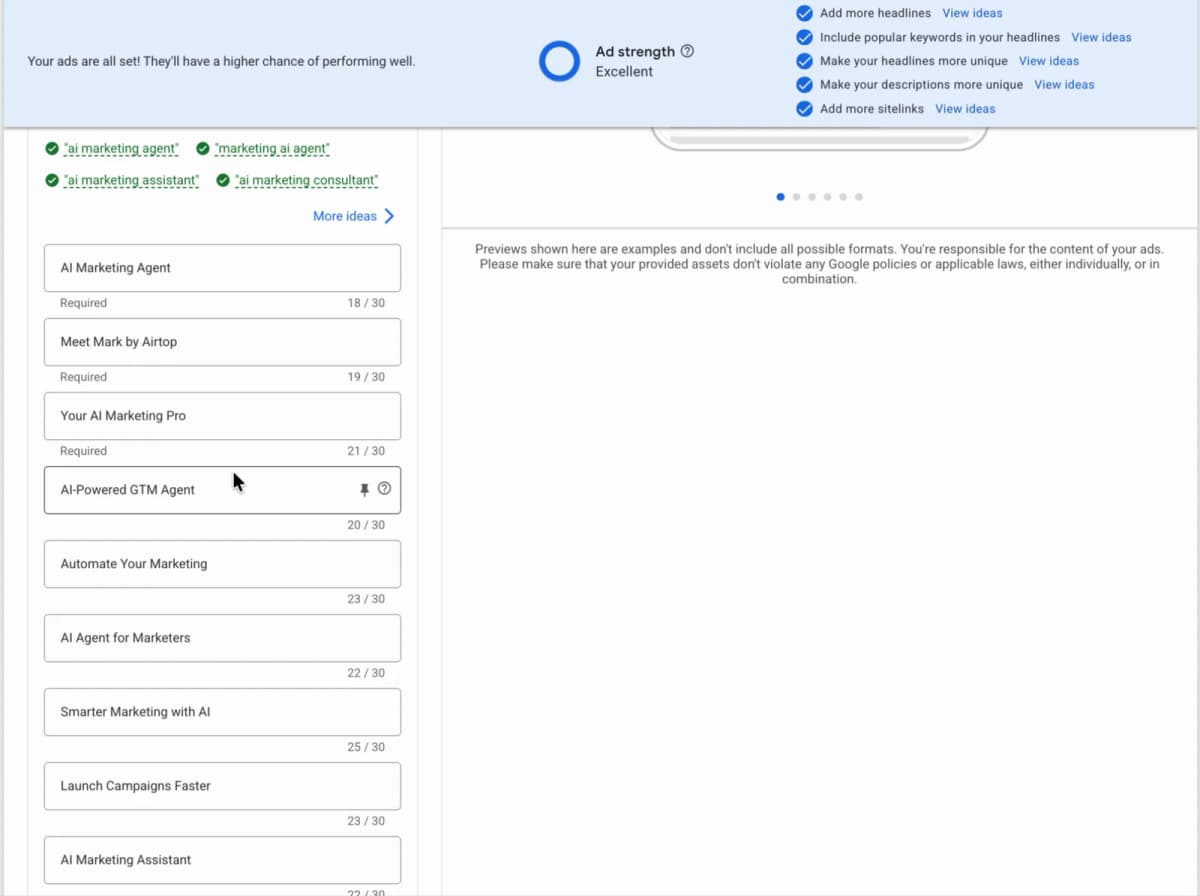
Ad strength: Excellent, with every checklist item satisfied. Not bad for a campaign whose entire brief was three sentences.
The technical details
For those who want to know what's happening under the hood:
- Write access lives in Mark, and only in Mark. Chatting with Mark is how campaigns get built and changed, and every one of those writes is approval-gated. Agents you schedule through the Agent Builder connect to Google Ads with read-only access: they can audit and report, but they cannot edit your account.
- It's the official Google Ads API, not screen automation. Campaigns, ad groups, ads, and keywords are created as structured mutate operations. Nothing clicks around inside your Google Ads dashboard.
- Approval summaries show the raw values. Budgets appear in micros, the API's native denomination (a 10,000,000 micros daily budget is $10), alongside keyword counts, asset counts, and headline counts, so you can sanity check a change before it lands.
- Ads are built to the platform's real limits. Responsive search ads get the full 15 headlines within 30 characters and 4 descriptions within 90, because ad strength depends on using them.
- Match types are explicit. Keywords are created as phrase or exact match by design, and negatives are managed as first-class lists. If you ask Mark to keep broad match out of a campaign, it will.
- Research comes from keyword planning data. Volume, competition, and bid range estimates per keyword, grouped into themes, so budget conversations happen before the campaign exists.
- It knows what the API can't do. A few settings (ad schedules and callout assets among them) aren't writable on every operation, and Mark responds by giving you the exact click path to set them manually rather than skipping them silently.
- Campaign builds deploy as drafts. An approved campaign lands in your account unpublished. Publishing it, and starting the spend, happens in Google Ads, by you.
Your budget, your final click
The autonomy split is simple: reading and analysis are autonomous, and writing only happens through Mark, behind an approval.
Mark can research, audit, and draft all day without bothering you. The moment a change would touch your account (creating a campaign, editing keywords, updating assets, anything that could affect spend), it becomes an approval card with a summary of exactly what will happen. Campaign builds get a second safety on top of that: they deploy as drafts, and you publish them from your Google Ads account when you're ready to start spending.
We built it this way because we run our own ads through it. This is the same setup managing Airtop's Google Ads account today.
Mark and Agent Builder
The integration has two halves with different permissions.
| You want to | Use | Google Ads access |
|---|---|---|
| Build campaigns, edit keywords, apply optimizations | Mark, in chat | Write, human-approved |
| Run scheduled audits and performance reports | Mark or Agent Builder | Read-only |
Mark is the half that can act. To build campaigns or change anything in your account, you talk to Mark, the AI marketing agent we launched on Product Hunt in July. Google Ads started as one of Mark's channels, and it quickly became the thing people kept asking about, so we built it out properly. Running ads through Mark also comes with context: Mark's workspace holds your company profile, ideal customer profiles, GTM strategy, and tone of voice, and the campaigns it drafts inherit all of it. Keywords follow your positioning, ad copy sounds like you, and optimization decisions can account for your whole funnel rather than clicks alone. In the session above, Mark wrote the ads for its own landing page, headlines included ("Meet Mark by Airtop" scored 19 of 30 characters), which is about as self-serve as marketing gets.
The Agent Builder is the half that watches. Both Mark and Agent Builder can create compiled agents for you that can run on a schedule or trigger. These agents connect to Google Ads read-only: they can pull information on campaign performance, CPA, etc on whatever cadence you set, and deliver findings to Slack, email, or Google Sheets. Agents can tell you exactly where budget is leaking and carefully monitor spend, but they cannot automatically make changes to a campaign. If an audit finds something worth fixing, that's your cue to talk to Mark.
If you want an AI marketing agent that plans and executes your whole go-to-market strategy, start with Mark. If you just want to generate scheduled audits and reports for Google Ads, you can start with the template below.


Getting started
- Have a Google Ads account. If you don't, going through Google's setup guide takes about ten minutes.
- Create an Airtop account if you don't have one. You can sign up for free.
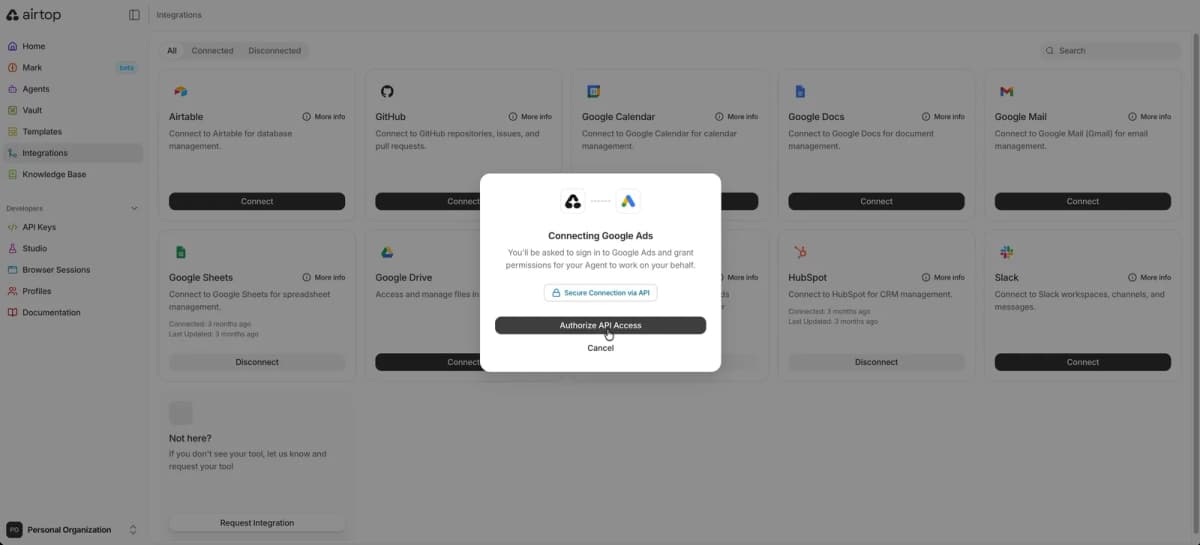
- Connect your Google Ads account to Airtop. You can do this in Airtop's Integrations panel.
- To build or optimize Google Ads campaigns, chat with Mark. Ask for what you want: "audit my Google Ads account", "research keywords for this landing page", or "build me a campaign with a $50/day cap". Mark does the heavy lifting, you approve changes, and finished campaigns deploy as drafts that you publish in your Google Ads account to start the spend.
- To create automated audits and reports, chat with Mark to build a compiled agent with read-only access to your Google Ads account. The reporting template above sends performance reports to Slack, email, or Sheets on the cadence you pick.
Who is this for? Solo marketers and lean teams running their own Google Ads without a PPC expert on staff. If you're frustrated with Google Ads, or just want help optimizing them, we built this integration for you.
Ready to stop struggling with Google Ads? Try Airtop free and let Mark run the parts you've been avoiding.